



REVO
POS for restaurants and cafés · Built by WaveIT
Your restaurant, in a single app.
REVO is the POS we built for restaurants and cafés: fiscal receipts on the cash register, orders sent to the kitchen, stock and e-Factura, in one app that keeps working without internet.
7 days free · No credit card · Setup done together with you
Offline
sell without internet
Fiscal receipt
straight from the POS
e-Factura
issue and receive invoices
In Romanian
app and support
REVO · Everything connected
One order. Five places updated.
Nothing gets typed twice.
1
The waiter takes the order
on a tablet or phone
2
The kitchen gets it
on a screen or printer
3
The fiscal receipt prints
on the cash register
4
The stock goes down
by recipe
5
The sale shows up
in the reports
REVO · Features
One app for the floor, the kitchen, the till and the stock
Fiscal receipt & e-Factura
Receipts print on the cash register straight from the POS, with X and Z reports; invoices go out and come in through e-Factura.
Works offline
Keep selling and sending orders to the kitchen; everything syncs when the connection returns.
Stock & recipes
Stock drops with every sale by recipe; goods receipts come from e-Factura, with inventory, batches and expiry dates.
Loyalty & vouchers
Points on every order, levels, coupons and gift cards.
Team with PIN
Every employee signs in with their own PIN; roles, time tracking and work schedule.
Table reservations
With time and number of guests, visible right in the POS.
QR menu
Guests see the menu with photos on their phone, no app needed.
Glovo & Wolt
Separate prices and a dedicated POS mode for delivery-platform orders.
Multiple locations
All your venues under one account, with figures for each.
REVO · Table service
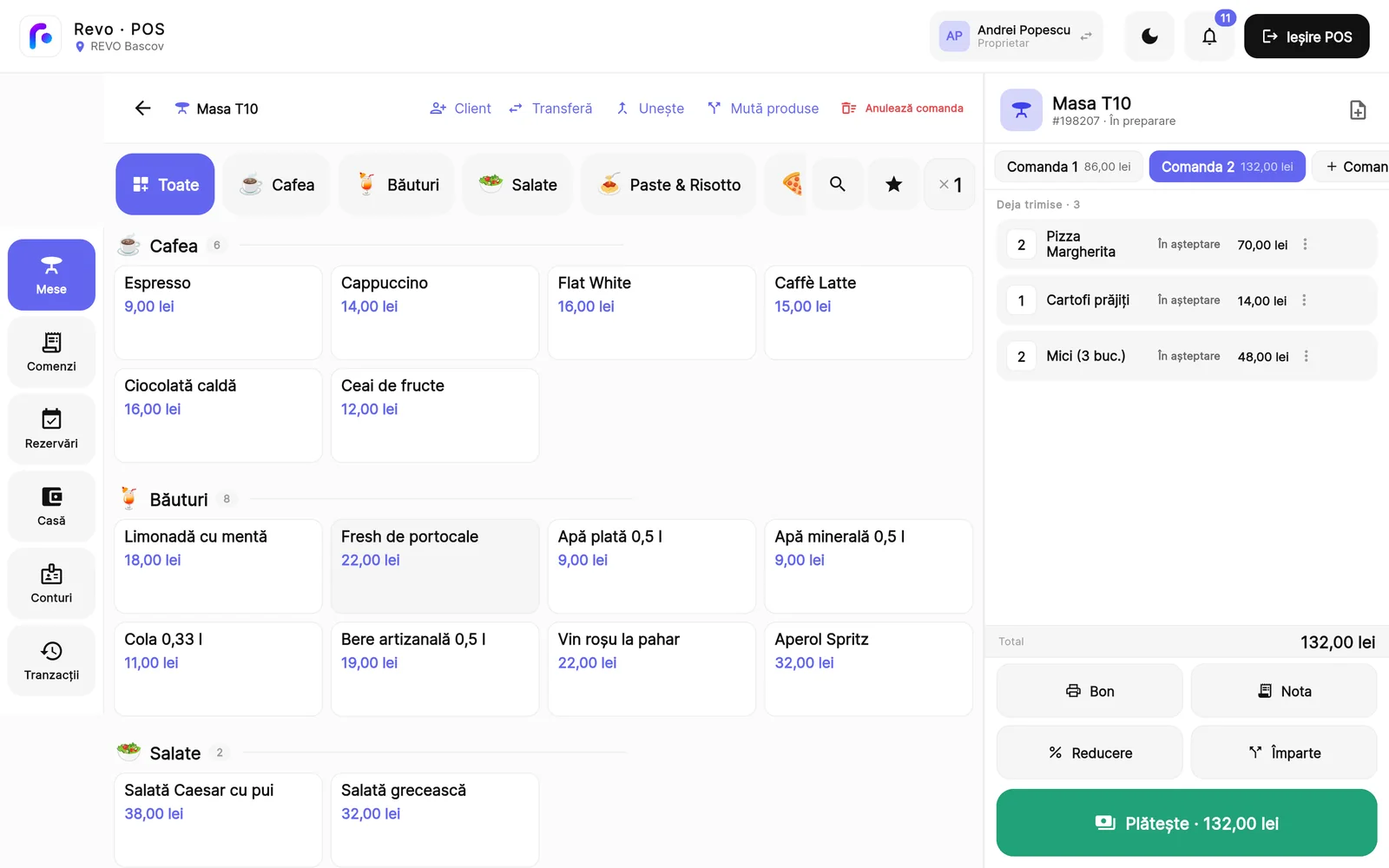
Orders at the table, from a tablet or phone
The waiter opens the table from the floor plan, adds the items and sends the order. It goes to the kitchen or the bar, as needed, and at the end you take cash or card.
- Floor plan with zones and tables; dine-in or takeaway
- Options, extras and notes for the kitchen
- Several orders on one table, paid separately
- Move all or some of the items to another table
- Split bill, partial payments and tips
- Discounts, refunds and complimentary items
REVO · Kitchen
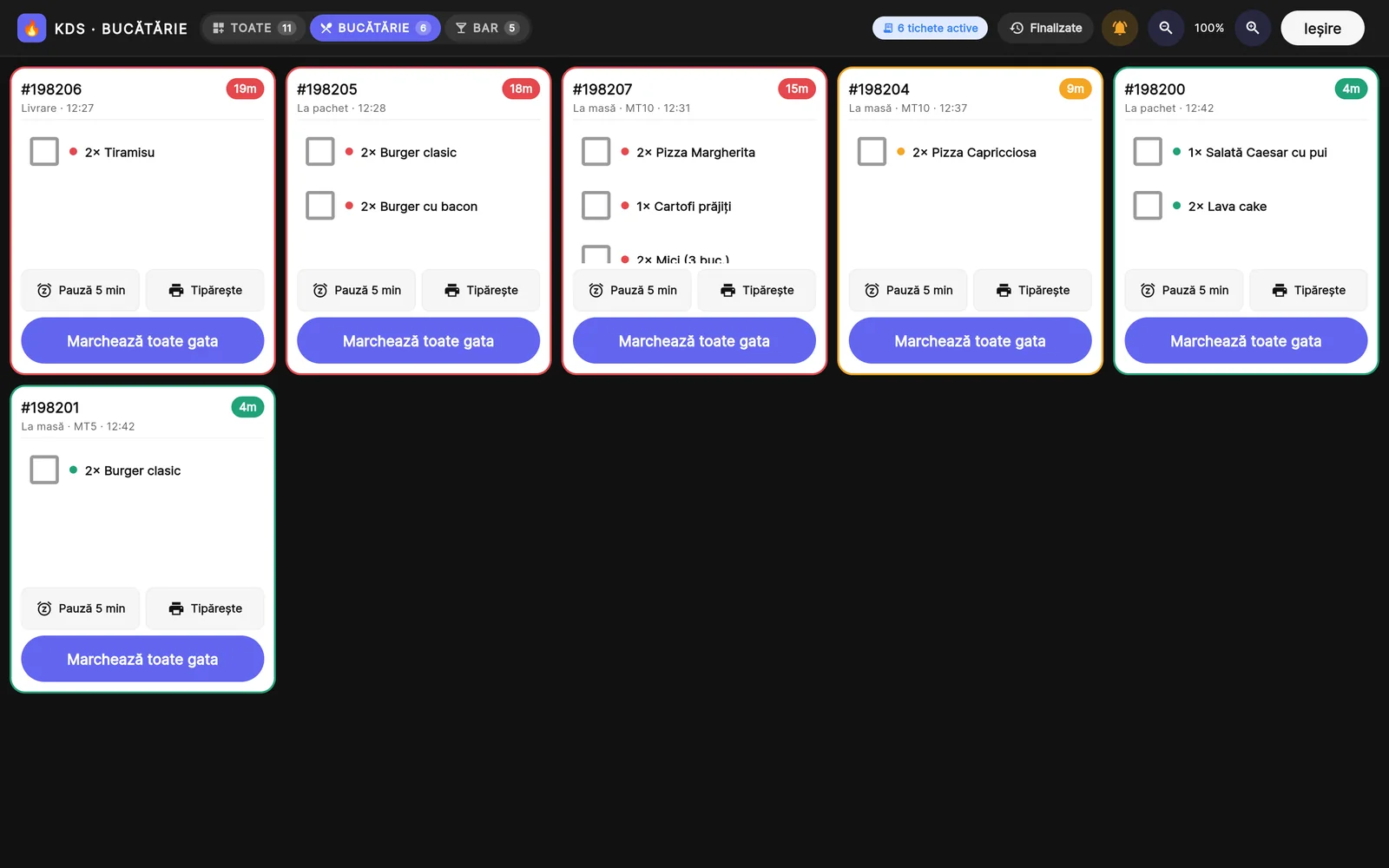
Kitchen display and station tickets
The order sent by the waiter appears on the kitchen or bar screen, or prints at that station’s printer. The cook sees what to make and how long each order has been waiting.
- Separate stations: kitchen, bar or your own, such as pizza
- A ticket printed at each station’s printer
- New, in preparation and ready, with the minutes elapsed
- A sound for new and changed orders
- Items added or cancelled after sending are clearly marked
- The course for each item: starter, first, second, dessert
REVO · Stock
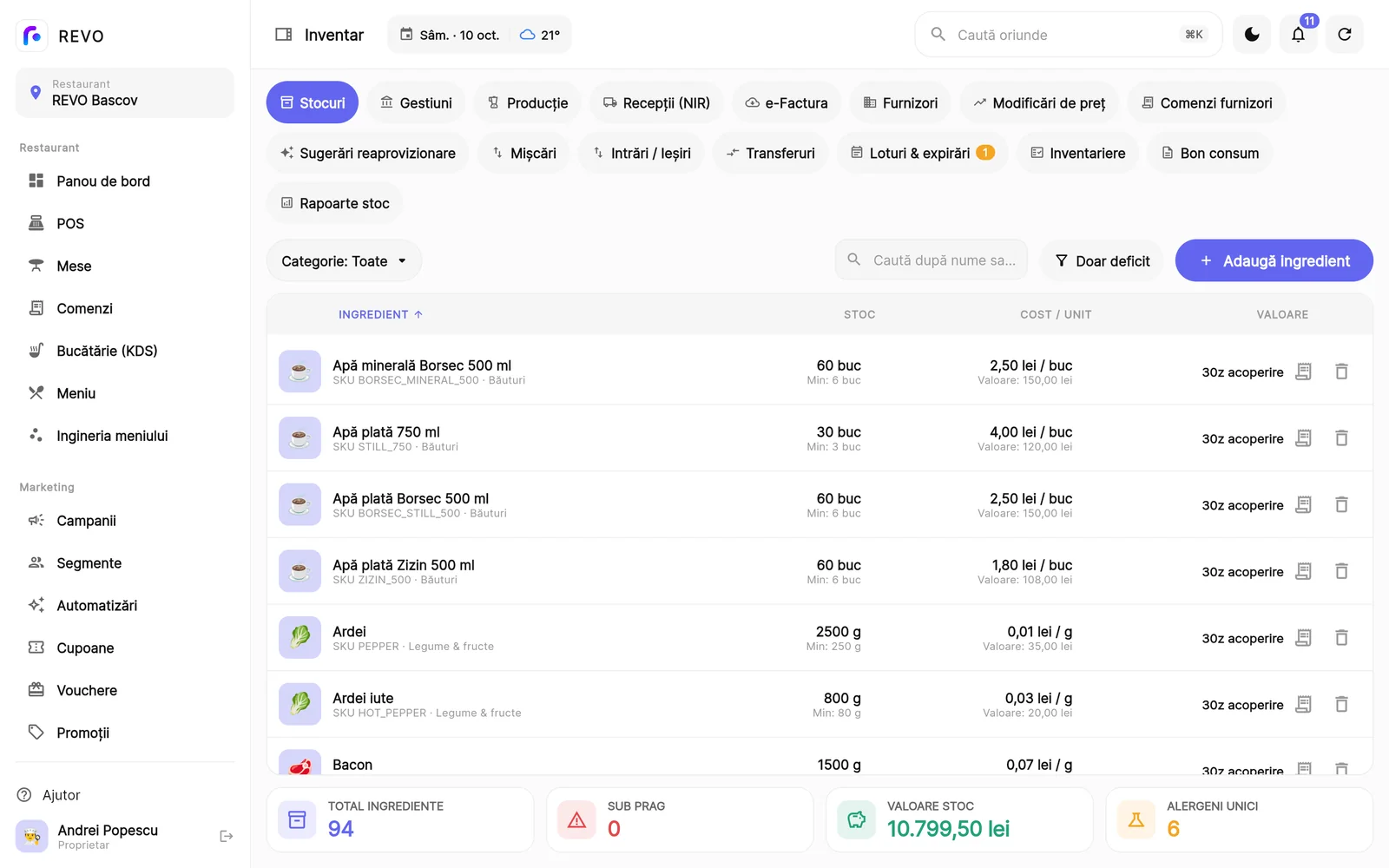
Stock and recipes, always up to date
Every product has its recipe. With each sale, REVO deducts the ingredients used, so you always know what’s on the shelf and what a portion costs.
- Recipes with the portion cost worked out from the ingredients
- A new recipe applies from the date you choose, without changing the past
- Separate stock locations and transfers between them
- A stock card for every ingredient: every entry and exit
- Batches and expiry dates
- Goods receipts, stocktaking with a differences report by email, waste and in-house production
REVO · Reports
Reports for you and your accountant
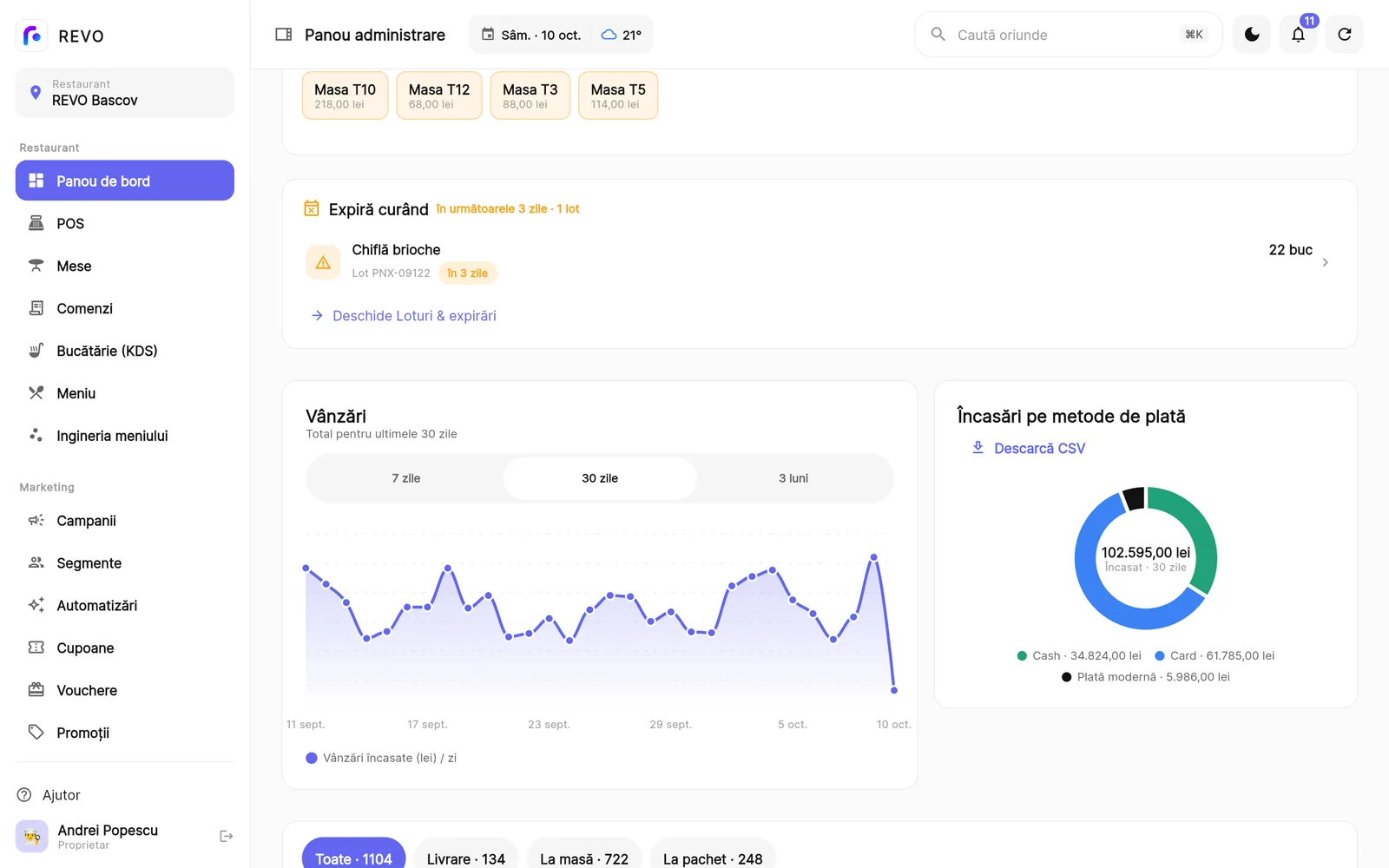
In the evening you see how much you sold, which products sell and what you earn on them. For the accountant, you export to Excel from your phone or computer.
- A dashboard with the day’s sales and daily goals
- Sales by day, week or month, compared with the previous period
- Monthly profit and loss
- Menu engineering: which products make money and which don’t
- Alerts for expiring batches and supplier price rises, in the app and by email
REVO · Floor plan
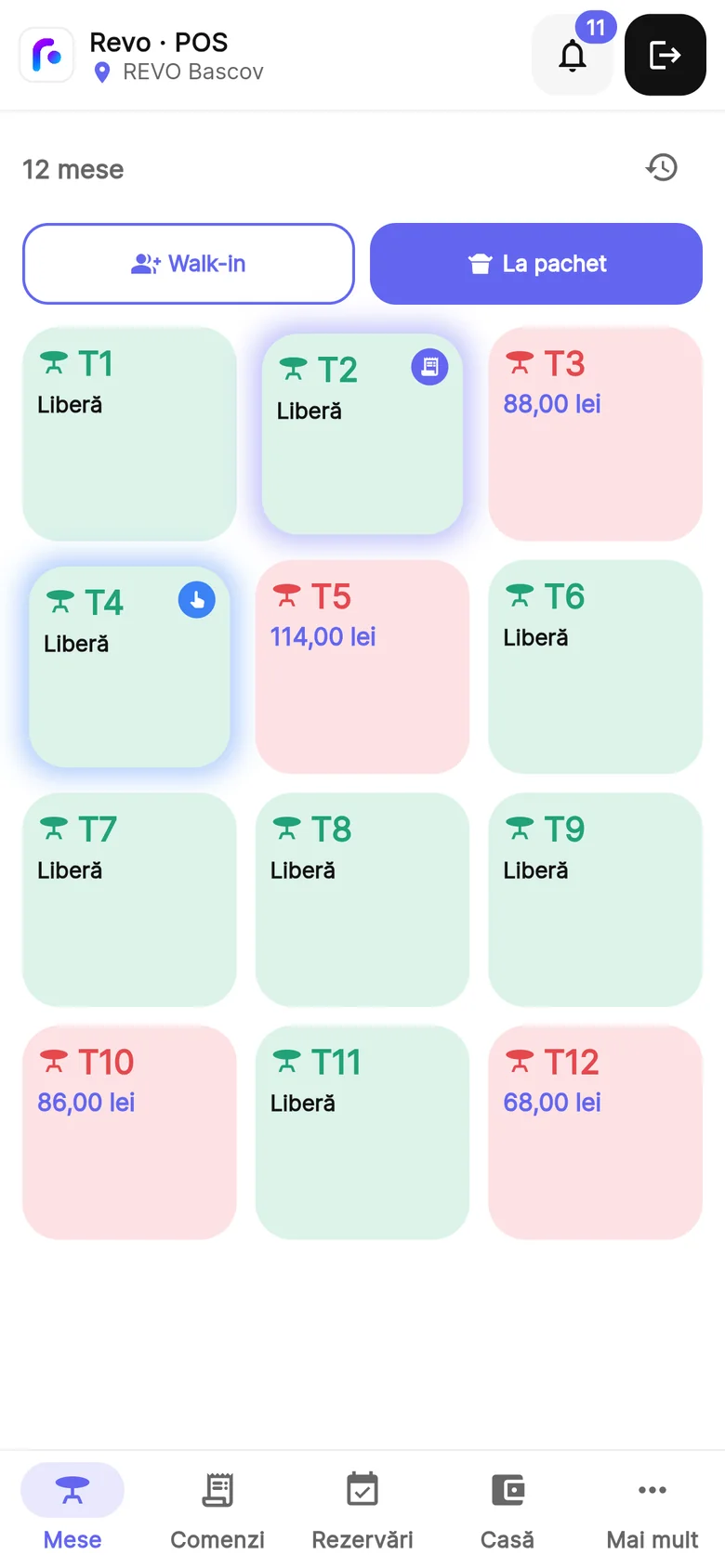
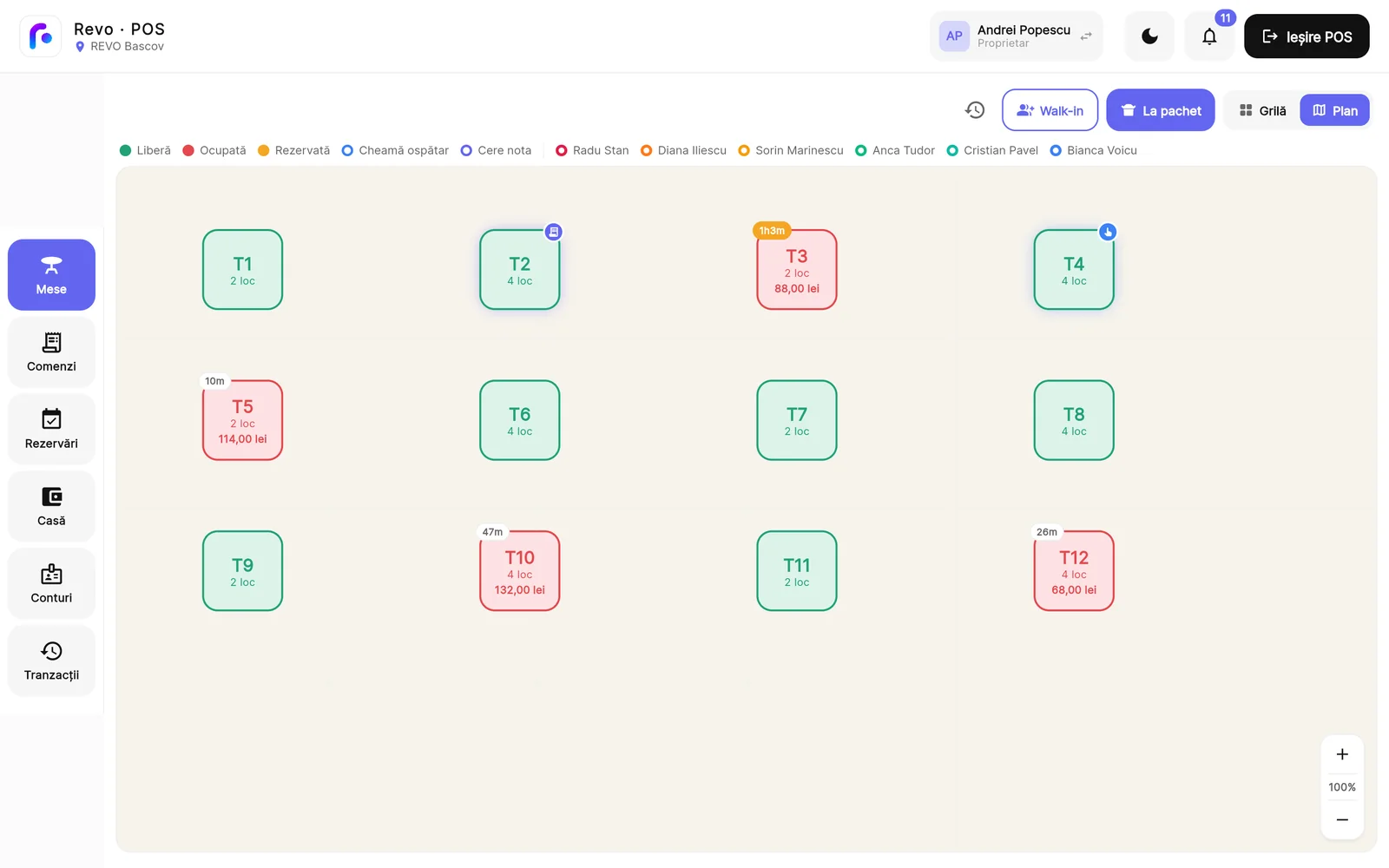
The floor plan, live
See at a glance which tables are free, occupied or reserved and how long guests have been seated. Tap a table and take the order.
- Colours per waiter
- Move and merge tables
- Reservations on the plan, with time and number of guests
REVO · Fiscal
Fiscal receipts and e-Factura, ready from day one
Cash register & fiscal receipt
REVO works with Datecs cash registers. The fiscal receipt prints straight from the app at payment, and you run the X and Z reports from REVO too.
- The cash drawer opens from the app
- The customer’s tax ID on the receipt, or an invoice on the spot
- Your logo on the receipt
- Archived fiscal documents and fiscal memory report
- XML export for ANAF, straight from the cash register
FISCAL RECEIPT
e-Factura, cash book and VAT
Connect REVO to ANAF’s SPV once. Issued invoices go out through e-Factura, and supplier invoices show up in REVO, ready to be received into stock without retyping anything.
- Issued invoices sent through e-Factura
- Supplier invoices pulled from the SPV
- Goods receipt (NIR) created straight from the received invoice
- REVO remembers which ingredient each supplier line is
- Cash book and VAT report for the accountant
RECEIVED INVOICES · E-FACTURA
REVO · Team & regulars
Your team and your regulars, in the same app
Team, time tracking and permissions
Every employee signs in to the POS with their own 4-digit PIN, so you never hand out your password. You know who took the order, who took the payment and how many hours everyone worked.
- Clock-in and clock-out, with breaks
- A published work schedule, leave and days off
- Roles and permissions: everyone sees only what they need
- A manager code for sensitive operations
- Tip sharing across the team and an audit log of who changed what, and when
Customers, loyalty and vouchers
Guests collect points on every paid order and move up from Bronze to Silver and Gold. The waiter finds them in the POS and uses their points at payment.
- Customer profiles with points and level
- Points on paid orders, by the rule you set
- Bronze, Silver and Gold levels, with your thresholds
- Coupons with a fixed or percentage discount, validity period and usage limit
- Vouchers and gift cards you issue, with the remaining balance
- Customer segments
REVO · For your guests
What your guests see
A menu with photos on their phone, the bill on a second screen and a tip they choose themselves.
Online menu with a QR code
Each location has a public menu page. Guests scan the code on the table and see products, prices and photos, without installing anything. Change a price in REVO and it changes in the online menu too.
- A QR code you download and put on the tables
- Product photos that enlarge on tap
- Allergens shown for every product
- Items marked as sold out disappear from the online menu
- We import your menu for you, for example from a PDF
The customer display
Put a second screen facing the guest, such as a tablet at the till. They see the bill as you add items and choose the tip themselves at payment.
- Items and total, shown as you take the order
- The guest chooses the tip from a few options, or no tip
- A QR code for reviews after payment, on screen and on the receipt
- Between orders, the screen shows images you choose
YOUR BILL · TABLE 7
Add a tip?
REVO · Made for
Built for every kind of venue
Cafés
Fast counter sales, a fiscal receipt on the spot and loyalty with points and levels. Coffee and milk stock drops by recipe.
Restaurants
Floor plan, orders by course on the kitchen display, split bills, table reservations and stock with recipes.
Pizzerias
Takeaway orders, separate Glovo and Wolt prices and a dedicated POS mode for platform orders.
Bistros
An online menu with photos behind a QR code, table reservations and loyalty points for returning guests.
Chains
Several locations in one account: menu, stock and reports per location, plus transfers between stock locations.
Something else?
Food truck, food court, canteen or something new: tell us how you work and we’ll show you how REVO fits.
REVO · Comparison
REVO vs classic POS systems
By “classic POS” we mean traditional systems with a purchased licence, installed on a dedicated computer in the venue. An honest comparison, point by point.
| Aspect | Classic POS | REVO |
|---|---|---|
| Upfront cost | A large investment in hardware and a licence | No licence to buy; the POS runs on an Android tablet |
| Monthly cost | A fixed subscription plus maintenance | A monthly subscription per location, with public prices |
| Minimum contract | Usually 2–3 years | Pay monthly, cancel anytime |
| Updates | Manual, paid separately | Included in the subscription |
| Customer loyalty | Missing, or a separate program | Built in: points, Bronze, Silver and Gold levels, vouchers |
| Glovo and Wolt orders | Often stay on the platform’s tablet | Entered in a dedicated POS mode, with separate prices per platform |
| Access from anywhere | Only on the computer it’s installed on | POS on an Android tablet, admin panel on phone and computer |
| Multiple locations | Very hard and costly | Native: every location under one account |
| Support | By appointment, within working hours | In Romanian, by phone and WhatsApp |
| If the vendor goes out of business | Locked hardware, lost data | The data stays yours, and you can export it |
Switching from an old system? Send us your menu, as an export from the old system or as a PDF, and we import it into REVO. We connect the cash register and printers and train the team, so you switch without closing the venue.
REVO · Getting started
Live the same day
We import your menu and you’re live in a few hours, not a few weeks. We do the technical part together with you.
Want to see REVO on your own menu? We show you everything in a 20-minute demo, at your venue or online.
1
Tell us about your venue
Fill in a short form and we contact you.
2
We import your menu
From an export of your old system or from a PDF.
3
We set everything up
We connect the cash register and printers and draw your floor plan.
4
We train your team
Then you start selling, with 7 days free and no card.
REVO · For developers
An open API for websites, apps and accounting
Connect a restaurant’s website, ordering app, accounting or dashboard to REVO. Read the menu, locations, sales and stock, and send orders that ring on the POS, with a key the restaurant creates and controls.
# GET /me
curl https://api.revoapp.ro/api/public/v1/me \
  -H "Authorization: Bearer rvo_live_…"

{ "business": { "name": "Bistro" },
  "scopes": ["menu:read", "sales:read"],
  "all_locations": true }
menu:readProducts, prices per channel, availability, allergenslocations:readAddress, opening hours, whether online orders are opensales:readPaid orders and daily totals, without customer datastock:readIngredients with current stock and minimumsorders:writeOnline orders that ring on the POS, with status webhooks and a test mode120 requests per minute per key · amounts in RON · v1 only ever adds; a breaking change would come as /v2, with both running for at least 6 months
REVO · Packages
Three packages, priced per location
Prices are public, in euro without VAT, per month and per location. Pay monthly or yearly (two months free) and cancel anytime, without penalties. The first 7 days are free, no credit card.
START
For a café, bistro or single location
- Floor plan, orders and kitchen
- Fiscal receipt, X and Z reports
- Invoices issued through e-Factura
- QR menu, reports, offline mode
COMPLET
For a restaurant with its own kitchen
- Everything in START, plus:
- Stock, recipes and goods receipts from e-Factura
- Stocktaking, batches and expiry dates
- Loyalty, vouchers and reservations
- Work schedule, roles and permissions
PREMIUM
For groups and larger operations
- Everything in COMPLET, plus:
- Several locations under one account
- Profit and loss, menu engineering
- Customer display with guest-chosen tip
- Glovo and Wolt, audit log
REVO · Questions
Frequently asked questions
Which cash register does it work with?
Datecs cash registers, connected to the tablet. The fiscal receipt comes straight from the POS, and we check your model together during setup.
Does it work without internet?
Yes. You take orders, send them to the kitchen and sell without internet; everything syncs on its own when the connection returns.
Which devices does it run on?
The POS runs on an Android tablet, and orders can also be taken from a phone. The admin panel opens on any phone or computer.
How do I start, and who does the setup?
Fill in a short form and we contact you. We enter your menu, connect the cash register and printers, draw the floor plan and train the team.
Can I cancel anytime?
Yes. You pay monthly or yearly and cancel anytime, without penalties. Your data stays yours.
What happens after the 7 free days?
You choose the package that suits you and carry on. We don’t ask for a credit card for the trial.
Do the prices include VAT?
No. Prices are in euro, without VAT, paid monthly for each location.
Do you take a commission on orders?
No. You pay a fixed monthly subscription per location, not a percentage of every receipt.
Designed and developed by our team
REVO is our own product. We can build software like this around the way your business works.
- Flutter POS app for tablets and phones
- Laravel back end and API
- Cash register and ANAF e-Factura integrations
- Offline-first sync between devices
- Public REST API with OpenAPI 3.1 documentation
Ready to run your restaurant from one app?
Seven days free, no credit card. We handle the technical setup together with you.